Quick Start
Get your team up and running with DeepReview in under 10 minutes. This guide walks you through integrating AI-powered code reviews into your Git workflow.
Prerequisites
- Admin access to your Git repository (GitHub, GitLab, or Gitee)
- A DeepReview enterprise account (contact us to get started)
- SSH key pair for repository access, or a deploy token (for token-based authentication)
Step 1: Get Your Enterprise Account
Contact our team to create your enterprise account. Once created, you'll receive:
- Enterprise Name: Your unique identifier for login
- Initial Password: Your temporary password (change it after first login)
Contact Us
Step 2: Login to Enterprise Portal
Access the enterprise portal at:
https://www.deepcodereviewer.com/portal
Enter your enterprise name and password to log in. After your first login, we strongly recommend changing your password for security.
Step 3: Add Your Repository
Once logged in, navigate to the Repositories tab and click the "+ Add Repository" button.
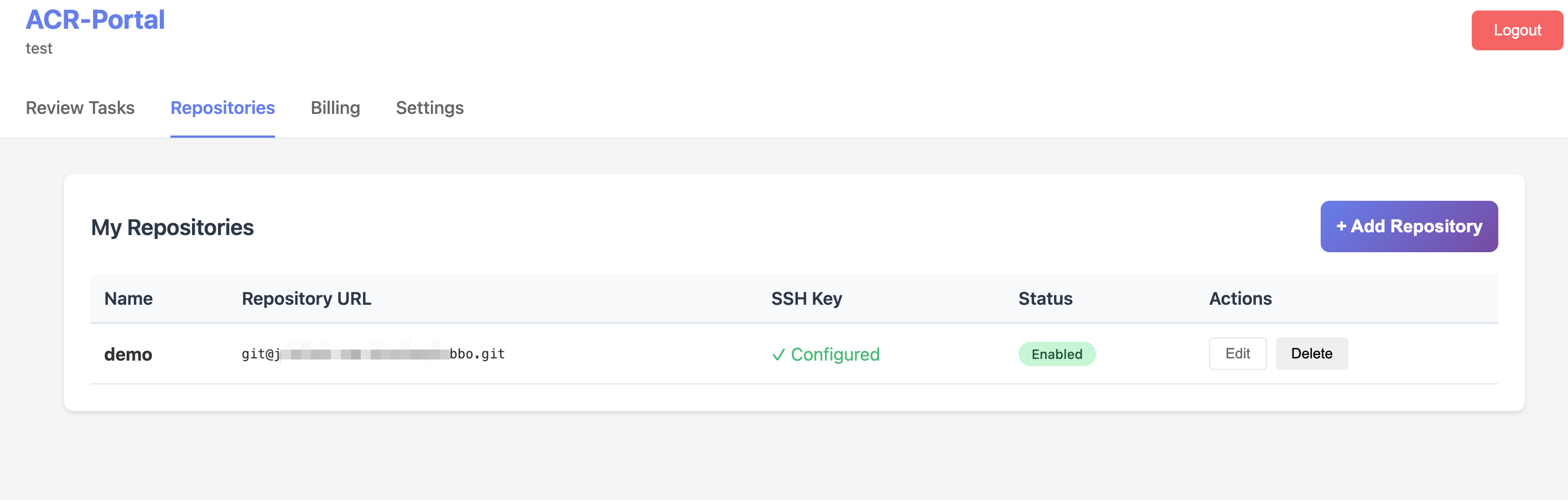
Enterprise Portal - Repositories Page
Fill in the repository details in the form. DeepReview supports two authentication methods:
Option A: SSH Key Authentication
- Name: Enter a display name for your repository (e.g., "my-project")
- Authentication Method: Select "SSH Key"
- Repository URL: Enter the SSH URL (e.g.,
git@github.com:your-org/your-repo.git)
- SSH Private Key: Paste your SSH private key (must have read access to the repository)
- Enable code reviews: Check this box to activate automatic reviews
- Click "Add Repository" to save
Option B: Token Authentication
- Name: Enter a display name for your repository (e.g., "my-project")
- Authentication Method: Select "Token"
- Git Clone Command: Paste the full clone command with embedded credentials. The required format is:
git clone https://<username>:<deploy_token>@gitlab.example.com/group/project.git
Important: The input must follow the exact format above — starting with git clone, followed by an HTTPS URL containing credentials (username:token@host). Token credentials will be encrypted and stored securely. The repository URL will be automatically extracted from the clone command.
- Enable code reviews: Check this box to activate automatic reviews
- Click "Add Repository" to save
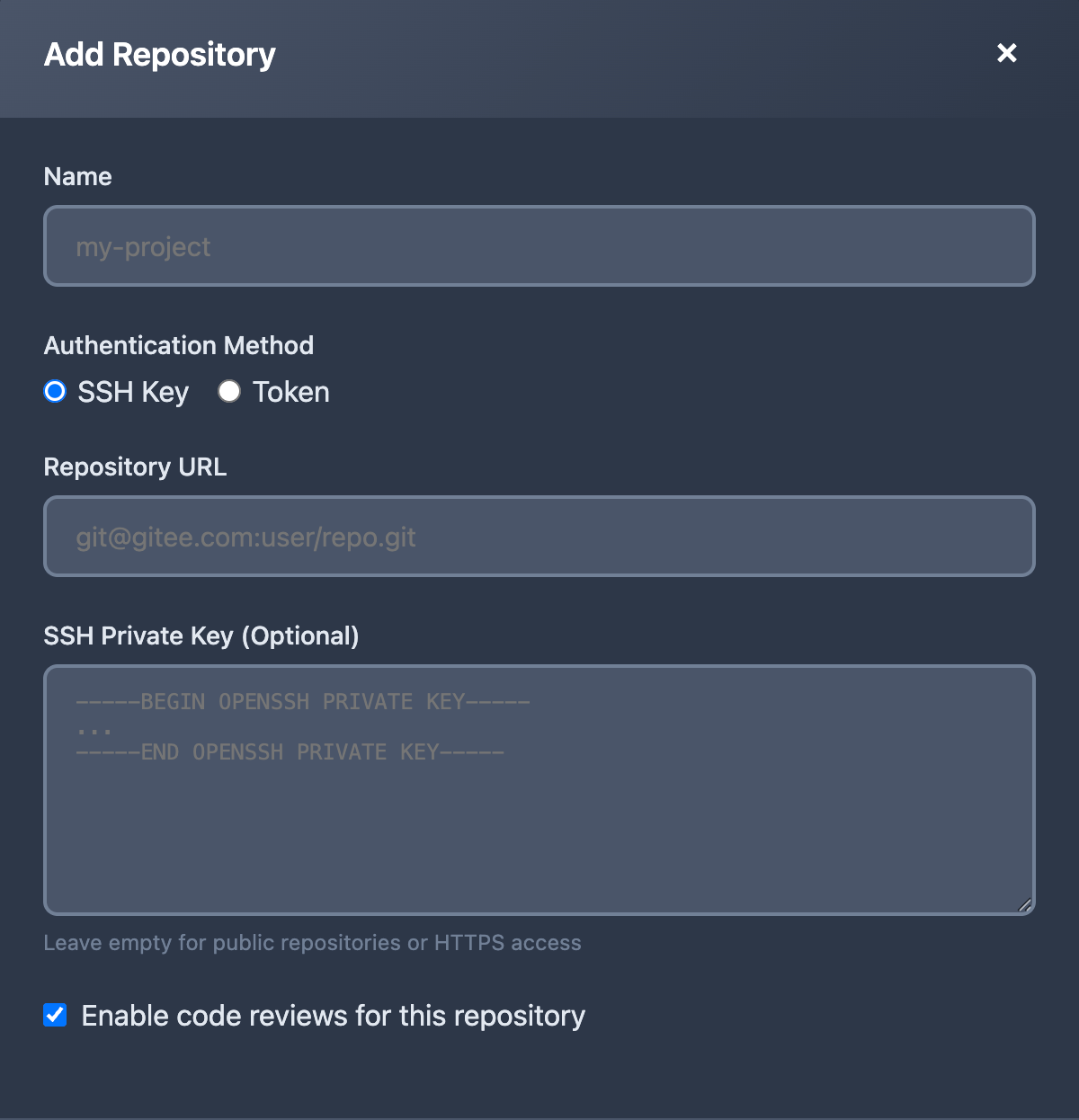
Add Repository Form
SSH Key Setup: Generate a deploy key for your repository:
ssh-keygen -t ed25519 -C "deepreview@your-company.com" -f deploy_key
Add the
public key (
deploy_key.pub) to your Git platform as a Deploy Key with read permissions, and paste the
private key (
deploy_key) content in the portal form.
Token Setup: For platforms that support deploy tokens (GitLab, JihuLab, etc.):
- Go to your repository or group → Settings → Repository → Deploy tokens
- Create a token with read_repository scope
- Use the generated username and token in the clone command format above
All credentials are encrypted and stored securely.
Step 4: Configure Webhook
Set up a webhook in your Git platform to notify DeepReview when code is pushed:
https://www.deepcodereviewer.com/api/webhook/<your-enterprise-name>
GitHub Setup
- Go to your repository → Settings → Webhooks → Add webhook
- Set Payload URL to the webhook URL above
- Set Content type to
application/json
- Select "Just the push event"
- Click Add webhook
GitLab Setup
- Go to your project → Settings → Webhooks
- Enter the webhook URL above
- Check Push events
- Click Add webhook
Gitee Setup
- Go to your repository → Management → WebHooks → Add WebHook
- Enter the webhook URL above
- Select Push event
- Click Add
Step 5: Push Code and Get Reviews
That's it! Now when you push code to your repository, DeepReview will automatically:
- Receive the webhook notification from your Git platform
- Clone your repository and analyze the code changes
- Use the ReAct AI engine to perform deep code review
- Generate a detailed review report within minutes
View all your review tasks in the enterprise portal under the Review Tasks tab:
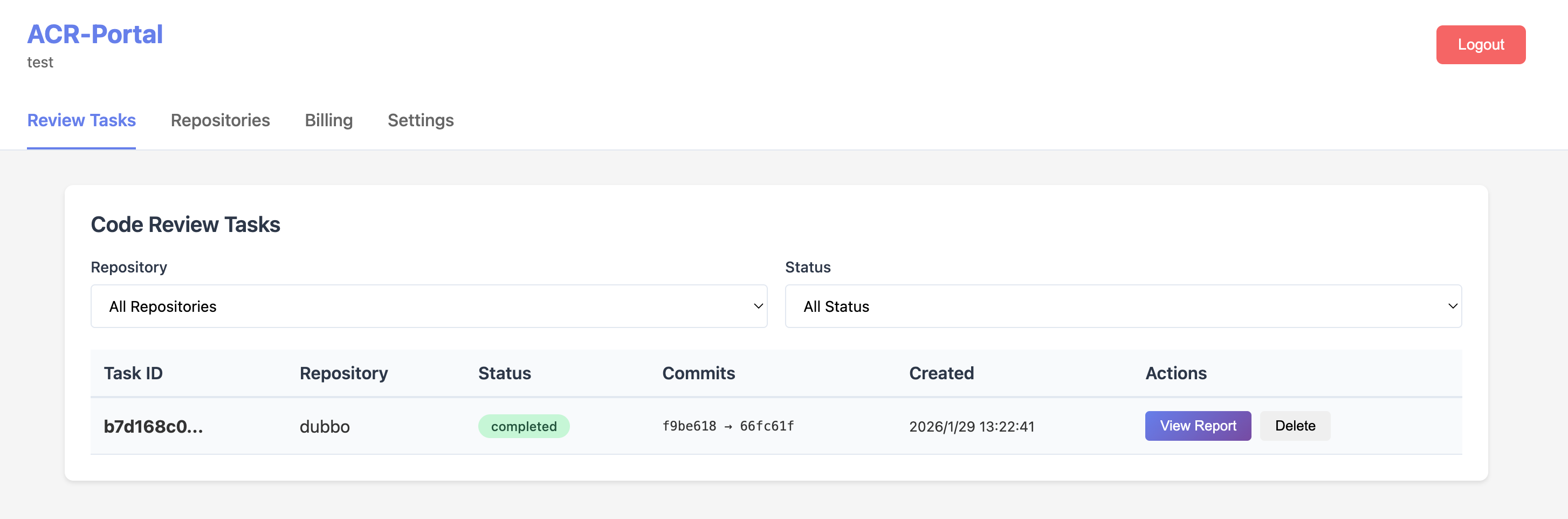
Code Review Tasks - Monitor review status and access reports
Click "View Report" on any completed task to see the detailed AI code review:
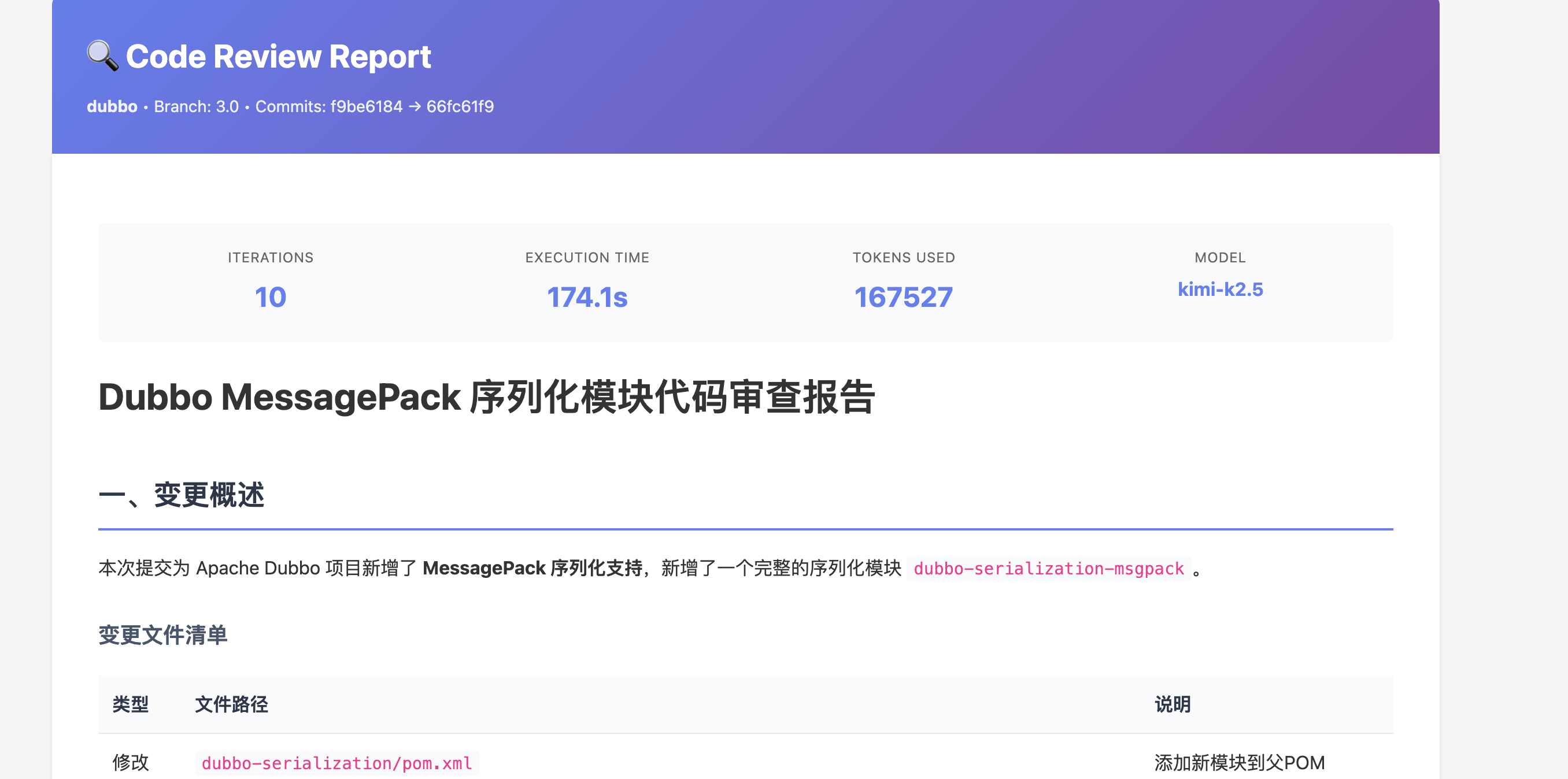
Detailed Code Review Report - Including change summary, file analysis, and AI recommendations
Key Advantage: DeepReview analyzes your entire codebase for context, not just the diff. This enables detection of cross-file issues, architectural problems, and potential bugs that traditional code review tools might miss.
Installation
DeepReview is available as a cloud-based SaaS platform for seamless integration with your development workflow.
Cloud SaaS Platform
The fastest and easiest way to get started. No infrastructure management required.
- Contact our sales team to create your enterprise account
- Receive your enterprise credentials (name and initial password)
- Login to the enterprise portal at www.deepcodereviewer.com/portal
- Add your repositories with SSH keys or deploy tokens
- Configure webhooks in your Git platform
- Start receiving AI-powered code reviews automatically
Benefits of Cloud SaaS:
- Zero infrastructure management
- Automatic updates and new features
- High availability and scalability
- Enterprise-grade security
- 24/7 technical support
Self-Hosted Deployment (Enterprise)
For organizations with specific compliance or data sovereignty requirements, private deployment options are available.
📞 Contact Sales Team
Self-hosted deployment requires an Enterprise license. Please contact our sales team to discuss your requirements and get deployment assistance.
Contact Sales
ReAct Engine
The ReAct (Reasoning and Action) engine is the core of DeepReview's intelligent code review capability. Unlike traditional static analyzers that apply fixed rules, ReAct enables the AI to think, explore, and iterate until it fully understands the code changes.
How It Works
The ReAct engine operates in iterative cycles, similar to how a human reviewer would approach code:
1
Think
Analyze the diff and reason about what context is needed
→
2
Act
Use tools to gather information (read files, search code, fetch docs)
→
3
Observe
Integrate findings and decide: loop back or generate report
Example ReAct Flow
The PR modifies the authentication function. I need to understand
how the password hashing is implemented.
read_file("src/auth/password.ts")
File contains bcrypt implementation with salt rounds = 10
I see a potential security issue - the salt rounds are hardcoded.
Let me check if there's a config file for security settings.
search_code("salt.*rounds", "src/", "*.ts")
Found: config/security.ts defines SALT_ROUNDS constant
The PR should reference the config constant instead of hardcoding.
I have enough context to generate the review.
Available Tools
The AI agent has access to the following tools during review:
| Tool |
Description |
Example Use |
read_file |
Read the contents of any file |
Understanding full function implementation |
search_code |
Search for patterns in codebase |
Finding all usages of a function |
list_directory |
Explore project structure |
Understanding module organization |
think |
Internal reasoning scratchpad |
Complex logical reasoning |
Key Advantage: Unlike diff-only tools, DeepReview can trace function calls, understand architectural patterns, and detect issues that require cross-file context.
Review Workflow
Understanding the complete flow from PR creation to review completion.
Synchronous vs Asynchronous Mode
| Mode |
Best For |
Response Time |
| Synchronous |
Small PRs (<500 lines) |
30-60 seconds |
| Asynchronous |
Large PRs, deep analysis |
2-10 minutes (webhook callback) |
Review Output Structure
Each review generates multiple outputs:
- Detailed Report: Full analysis with all findings
- Summary: Executive summary for quick overview
- Suggestions List: Actionable items with severity levels
- Inline Comments: Posted directly on PR lines
Severity Levels
| Level |
Icon |
Description |
| Critical |
🔒 |
Security vulnerabilities, data loss risks |
| Warning |
⚡ |
Performance issues, potential bugs |
| Info |
💡 |
Code style, refactoring suggestions |
Retry & Fault Tolerance
DeepReview implements multiple layers of fault tolerance to ensure reliable reviews.
Retry Strategy
| Error Type |
Strategy |
Max Retries |
| Network timeout |
Exponential backoff |
5 |
| Rate limit |
Wait + retry |
5 |
| Context too long |
Switch to fallback model |
1 |
| Model unavailable |
Exponential backoff |
5 |